NO to expensive control panels, YES to no-nonsense
Webdock is a great control panel alternative to all the big and expensive Cloud Hosting Solutions in the market.
Why is the Webdock Control Panel so good?
A user-friendly control panel for your VPS. And it's free
The Webdock Control Panel is free and doesn’t need to be installed on your server. It works out of the box once you have signed in and created a VPS server with us. You can use it in your browser or as a native app for iOS and Android. You can manage your web server in all important details, such as FTP, SSH and your Database, 1-click installation of WordPress and much much more. Our free control panel is one reason users rate us the best cheap vps solution for ease of use.
The Webdock Control Panel is a great alternative to other free panels (which need to be installed after you create your server, unlike the Webdock Control Panel) such as a CyberPanel alternative or as a DirectAdmin alternative, and it is possibly an even better alternative to all the paid panels out there.
We can host just about anything
Webdock is a universal cloud and our VPS tooling and workflow is optimized for.

PHP

NodeJS
Maria DB

Laravel

WordPress
Supported Operating Systems

Perfect Servers
Our own pre-configured Ubuntu LAMP and LEMP stacks.

Ubuntu
Every Ubuntu Server LTS release still in support.

Debian
Every Debian LTS release still in support.

AlmaLinux / CentOS
The current AlmaLinux and CentOS LTS releases.
Our No-Nonsense App
Monitor. Manage. Create.
Create servers, keep an eye on the ones you have and open an SSH session from your phone, all in the free Webdock Mobile App.

Test
webdockpremium-2024 · 45.136.70.75
u16r2test
webdockryzen9-bit-2024 · 89.28.236.36
u12test
webdockbit-2024 · 45.148.31.186
Prefer chat to clicking? You can also manage your servers from your AI client with Webdock MCP.
Reviews
Universally loved Control Panel
The webdock UI is extremely refreshing and beautiful. And it's not just beauty, but also brains! The user interface to kick off a new VPS along with setting up initial users, sudo etc are so intuitive and user friendly that it feels like a breath of fresh air. And the VPS's themselves are extremely snappy. I am a power linux user and have tried VPS's from Amazon, Oracle, Microsoft, and so many other vendors, but trust me, that no one gives such an extremely pleasant interface where things are intuitive and pleasing to work with.
Along with WebDock, I've used a number of VPS providers. With its very simple setup and reasonable pricing, Webdock.io really impressed me. Its so intuitive! Everything just works right out of the box, and the web interface is great for situations where you need to access SSH while you're on the go but can't ordinarily use SSH-terminal. Anyone who needs a VPS should check out Webdock.io. A wonderful experience all around.
Webdock offers an excellent experience. It features a practical user interface, you can deploy a service or website with intermediate knowledge about Virtual Servers. WordPress deployment it's straightforward; Linux images provided work out of the box. Security is a priority for the user account you get 2FA and for the deployed servers. All services are covered SSH, FTP, SFTP, MySQL. You get a web interface SSH terminal in their backend, and password based auth is disabled by default, so you must set up a key pair. Connection is really fast; You get free ssd Snapshots.
No Installation Required
Create a Webdock server with a LAMP or LEMP stack and our Web Server Control Panel is ready to use. Nothing extra to install and no resources taken from your server. Our Apache and Nginx stacks come preconfigured with everything you need to host websites and web applications. WordPress can be installed directly through Webdock, while other CMSs and applications can be installed manually. Manage Shell Users, MySQL, PHP settings, FTP users, Cron Jobs and more directly from our Web Server Control Panel. See all our Server Control Panel Docs.
Free SSL Certificates
HTTPS is free on Webdock thanks to our Lets Encrypt integration. Certbot is pre-installed on every Webdock Perfect Server Stack, and you generate or re-generate certificates for your sites straight from the Webdock Web Server Control Panel, with no certificate bill attached.
Free Backup Snapshots
Snapshot coverage here is generous by design: 2 daily and 3 weekly full-server snapshots, plus 3 slots for snapshots you take yourself at any time on each server. Restoring one onto a live server is quick, needs minimal downtime and takes a couple of clicks in the Webdock Control Panel, which reloads the server from the snapshot you picked. Any snapshot can also be used to build an entirely new server.
Free Transactional Emailing
Outgoing mail can run through Postmark for free, with us covering the cost. Validate your domain using DNS records on our easy to use email management screen and you will get a Postmark API key that works for SMTP mailing as well. WordPress sites need nothing more than the Postmark plugin and that key pasted in. Delivery is dependable and every message is easy to track.
free transactional emailing with PostmarkFree Email Forwarding
ImprovMX handles free email forwarding for your domain(s). You can skip the mailbox entirely: validate the domain with DNS records on our easy to use email management screen and add whatever forwarding rules you need.
How to get started
Ready to get started? Take the next step towards creating a server with a free Control Panel included.
Step 1
Sign up
Sign up and create a user.
Step 2
Add payment
Add a valid credit card Paypal account as your payment method.
Step 3
Enjoy
Choose a server and spin it up with the Webdock Control Panel.
Docs
Get the most out of your Webdock Control Panel
We’ve included all details about the Webdock Control panel in our /Docs.
Awards
Awards
We are proud of the many awards we have received over the years from independent third parties.












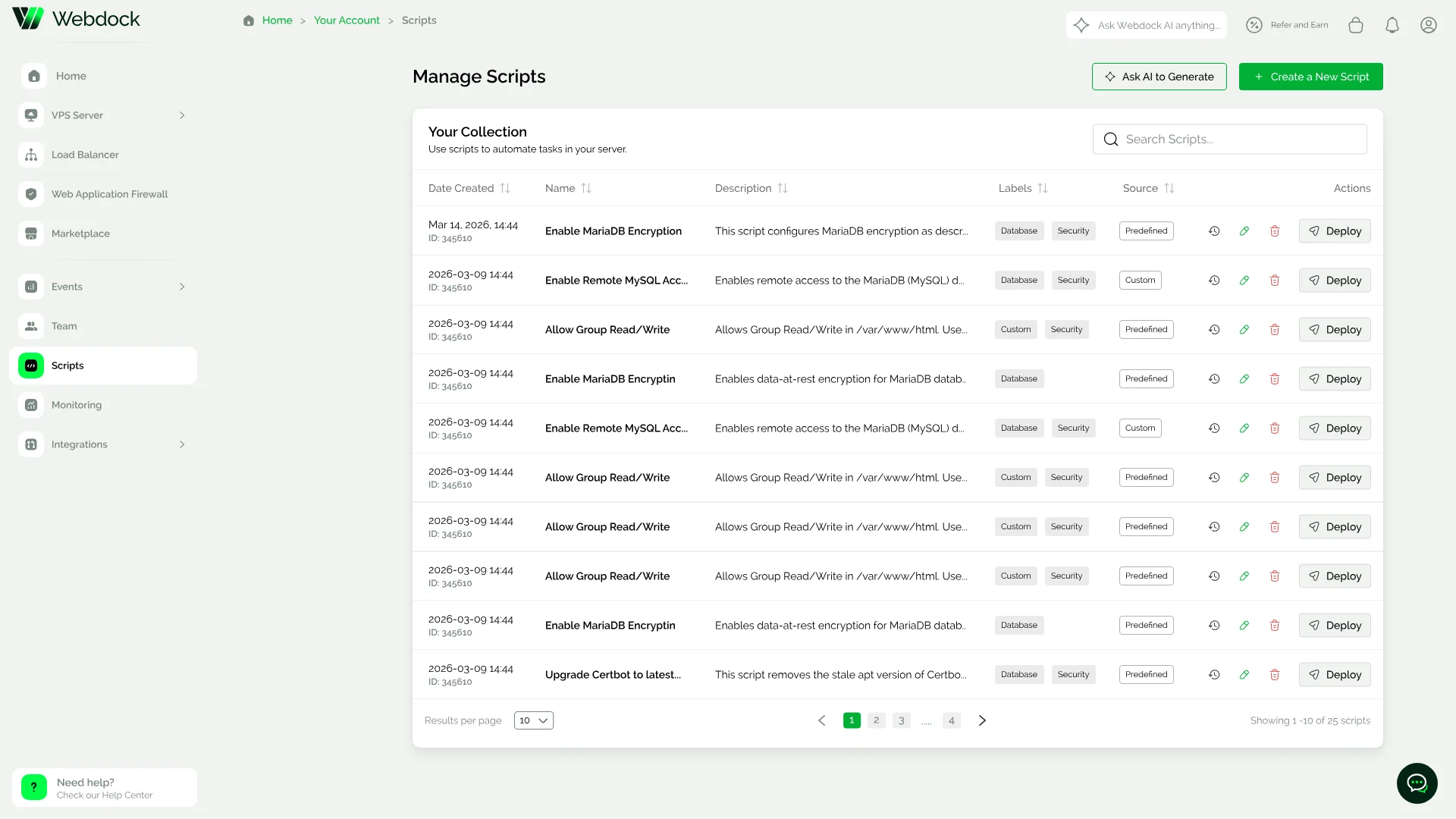
Scripts
Automate repeatable setup, one click per server
Keep a collection of predefined and custom scripts in the control panel, labelled and searchable, and deploy any of them to a server without opening a terminal.