
Deploy and automate your infrastructure
Deploy APIs, web applications, and automated workloads on AMD and Intel infrastructure with full root access. Provision and manage your servers through our API, CLI or dashboard, run reusable scripts, and connect monitoring events directly to your workflows.
How to get started
Step 1
Sign up free
Create your account in under a minute.
Step 2
Choose your setup
Start with a preconfigured server or a clean OS image.
Step 3
Your server is ready
Connect via SSH and start deploying. Root access is available whenever you enable it from the dashboard.
Features
Developer-first infrastructure
We get out of your way so you can build.
Root access on demand
Enable root access from the dashboard and own your environment end-to-end.
Powerful REST API and CLI
Automate provisioning, scaling, and snapshots programmatically with the documented REST API, or drive it all from your terminal with Webdock-CLI.
Perfect Server Stacks
Pre-configured LEMP, Node and more, production-ready out of the box, with Python and pip pre-installed. Or pick a clean OS image and build it your way.
Deploy in Seconds
No provisioning queues, no waiting on a sales rep. Choose your exact RAM, CPU, and disk, and SSH in within seconds via a great cheap VPS built to scale with your project.
Scale without support tickets
Resize RAM, vCPUs, or disk from the dashboard in seconds. RAM and vCPUs scale both ways, disk upgrades only. No migration and no waiting, just a quick reboot to apply the change.
Support that solves it
Database connectivity, DNS, reverse proxy config, our team resolves real technical issues fast. Not a first-line script. Not a 48-hour ticket queue.
API & CLI
Provision a server with one call
A documented REST API with token auth, plus the open-source Webdock CLI, so every server, snapshot, and script is scriptable from your terminal.
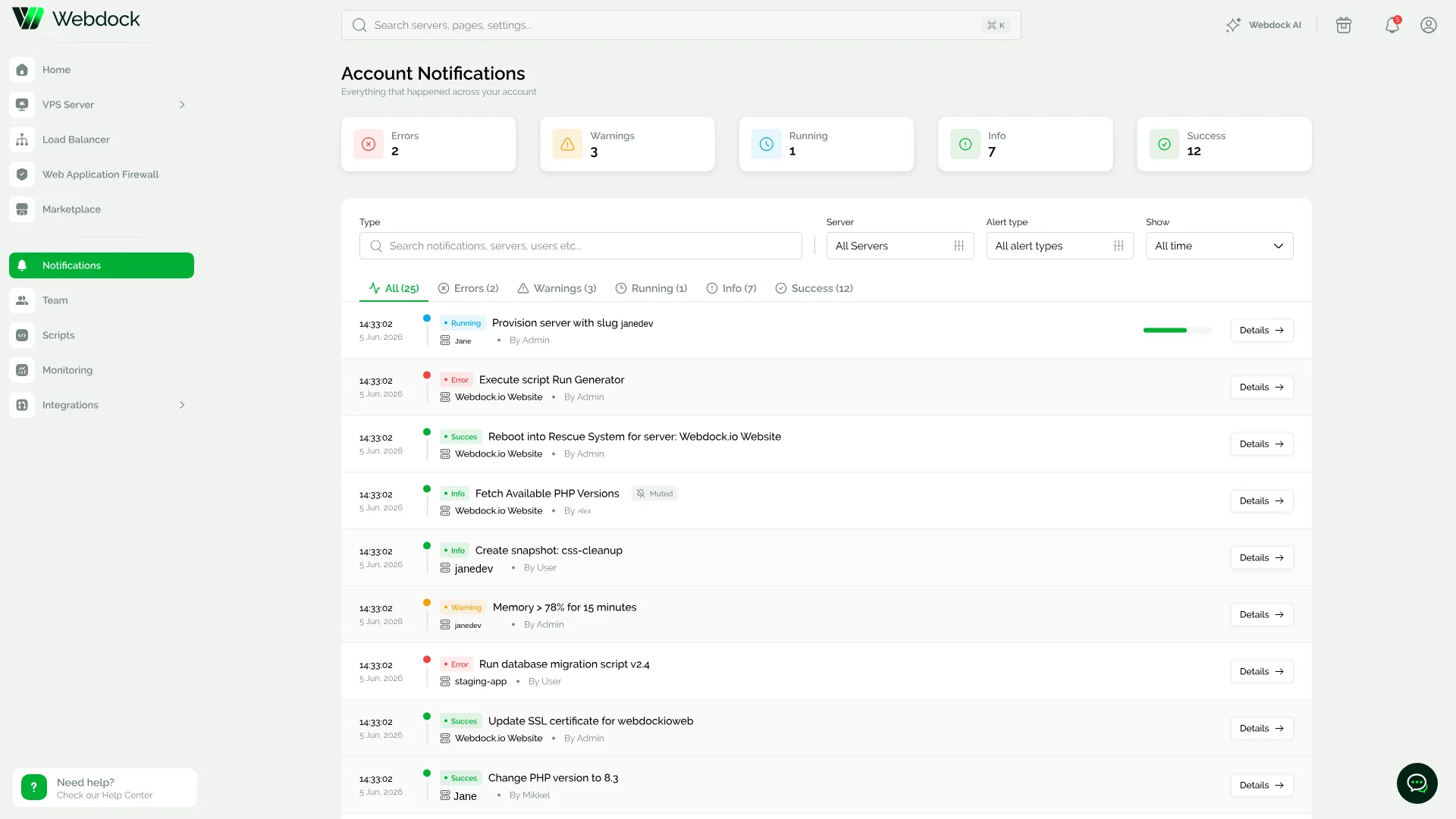
Server notifications
Every alert and event on one timeline
Errors, alerts, recoveries, and events for a server in a single feed, each with the rule that triggered it and a jump straight to the logs, so you debug from evidence instead of guesswork.
Technologies & Partners







Features
Free tools & services included
No add-on fees. Postmark email, forwarding and WordPress management unlock on any server from €5.99/mo, everything else ships with every plan.
Free Backup Snapshots
2 daily and 3 weekly automated snapshots per server, plus 3 slots you control yourself. Restore any of them in seconds, at no extra cost.
A Real Control Panel, Free
Stop paying separately for cPanel, Plesk, Laravel Forge, RunCloud, or SpinupWP. Our dashboard handles it, included.
Built-In Server Monitoring
Uptime monitoring out of the box, with health checks and SSL monitoring on the roadmap.
Free Mobile Apps
Manage your servers on the go with our iOS and Android apps.
Free Transactional Email & Forwarding
Postmark-powered transactional email and ImprovMX email forwarding, both included free.
Free AI Assistant
Get instant, documentation-backed answers to hosting and server questions, day or night.
Try the AI AssistantTechnical specs
Know what you’re deploying
Review our technical details before choosing a server.
Private interconnects
Reliable connections to major platforms
Traffic to Google, Amazon, Microsoft, and Meta travels through private interconnects for faster, more reliable routing. This connectivity is included with every Webdock server.
Bring your own stack

Laravel

PHP
MariaDB

Node.js

WordPress
Reviews
Trusted by teams who ship
I must say the support at Webdock VPS hosting is outstanding and the techs do know what they are doing. My biggest concern while hosting on a shared host is, if my sites will be safe from any security exploits or bugs in the applications which are used on the host. All these fears have disappeared with the servers being managed efficiently by the techs.
Would like to commend the very high level service of the staff. They have demonstrated much patience and knowledge in helping me remotely in setting up my email account on my newly acquired MacBook. Despite me being a total IT idiot, they were very patient in assisting me in getting my setup going.
Migrating to Webdock was straightforward. The technical support was fast and competent. Our servers are performing better than before, and the pricing is fully transparent. The team management feature has also proven very useful for how we work.