

Some of the most useful jobs an agent does are small and repetitive. This part adds two of them to your Hermes Agent server: reminders for dates you can't miss, and a monthly expense report. It continues from Part 2, which set up the dashboard and Telegram.
By the end of this part you'll have
- A daily check that warns you before important dates
- A monthly expense report with a PDF, delivered in Telegram
- A pattern you can reuse for other repeat jobs
Who this part is for
Four pieces, many jobs
Both jobs are built the same way, and so is almost any repeat job you add later:
A File
A CSV or Markdown file in ~/.hermes/data holds what the job needs. You can open it and fix a row by hand.
A Script
A short script in ~/.hermes/scripts decides whether there's anything to do today.
A Schedule
A Hermes cron job runs the script at a set time. The gateway checks its schedule every 60 seconds.
A Message
The result arrives in Telegram. On quiet days, nothing is sent.
Two rules for scripts
Scripts must live in ~/.hermes/scripts/, or Hermes won't run them. Scripts also don't get your model provider's API keys, so anything that needs a model goes in the Hermes prompt, not the script.
Set the home channel and check the clock
Two quick checks keep jobs from firing at the wrong time or sending nowhere. Scheduled jobs deliver to your Telegram home channel, so send /sethome once in the chat with your bot if you haven't yet. The times below assume the server clock uses your timezone (Part 1, Step 2) and that the gateway is running.
timedatectl | grep "Time zone"
hermes cron statusNever miss a renewal or a birthday
Domain renewals, a passport expiry, the end of a contract, a birthday. Keep them in one file and let a script check it every morning. It prints a message only when something is due, so on other days Hermes stays quiet.
mkdir -p ~/.hermes/data/dates ~/.hermes/scripts
cat > ~/.hermes/data/dates/important_dates.csv << 'EOF'
event,date,repeat,notice_days,note
Domain renewal example.com,2027-03-03,once,30 7 1,Renew at the registrar
Passport expiry,2027-06-15,once,60 30,Book an appointment
Mom's birthday,03-14,yearly,7 0,Loves lemon cake
EOF
File format
You can also add rows from Telegram: "Add my domain renewal for example.com on 3 March 2027 to important_dates.csv. Warn me 30 and 7 days ahead."
#!/usr/bin/env python3
import csv
from datetime import date
from pathlib import Path

FILE = Path.home() / ".hermes/data/dates/important_dates.csv"
today = date.today()

def next_date(value, repeat):
    if repeat == "yearly":
        month, day = map(int, value.split("-"))
        for year in (today.year, today.year + 1):
            try:
                d = date(year, month, day)
            except ValueError:  # Feb 29 in a non-leap year
                d = date(year, 2, 28)
            if d >= today:
                return d
        return None
    return date.fromisoformat(value)

lines = []
with FILE.open(newline="") as f:
    for row in csv.DictReader(f):
        when = next_date(row["date"].strip(), row["repeat"].strip())
        if when is None:
            continue
        days = (when - today).days
        notice = [int(n) for n in row["notice_days"].split()]
        if days in notice:
            label = "today" if days == 0 else f"in {days} days ({when:%d %b})"
            note = f" Note: {row['note']}" if row["note"].strip() else ""
            lines.append(f"{row['event']} is {label}.{note}")

if lines:
    print("Reminders:\n" + "\n".join(lines))
Save the script as ~/.hermes/scripts/date_reminders.py, for example with nano ~/.hermes/scripts/date_reminders.py, or ask Hermes to save it in its scripts folder. Create the job with --no-agent: the script's output becomes the message, and no model runs, so a quiet day costs nothing. This job checks the file every day at 9:00.
chmod +x ~/.hermes/scripts/date_reminders.py
hermes cron create "0 9 * * *" --no-agent --script date_reminders.py --deliver telegram --name date-reminders
hermes cron list
To test it, add a row dated today with notice_days 0, then run the job by its ID from hermes cron list. The message should arrive within about a minute, on the next scheduler tick. Delete the test row afterwards, or it comes back every year.
echo "Test reminder,$(date +%m-%d),yearly,0,Delete me" >> ~/.hermes/data/dates/important_dates.csv
hermes cron run <job id>
No message?
Run hermes cron list and check the job's last status. If delivery failed, send /sethome to your bot again. If the job ran but sent nothing, check that the test row's date matches today.
One-off reminders don't need the file. Ask Hermes in Telegram, for example "Remind me tomorrow at 10:00 to call the dentist", and it creates a scheduled job for it. For short delays, a chat command works too:
/cron add "in 30m" "Remind me to check the deployment"A monthly expense report
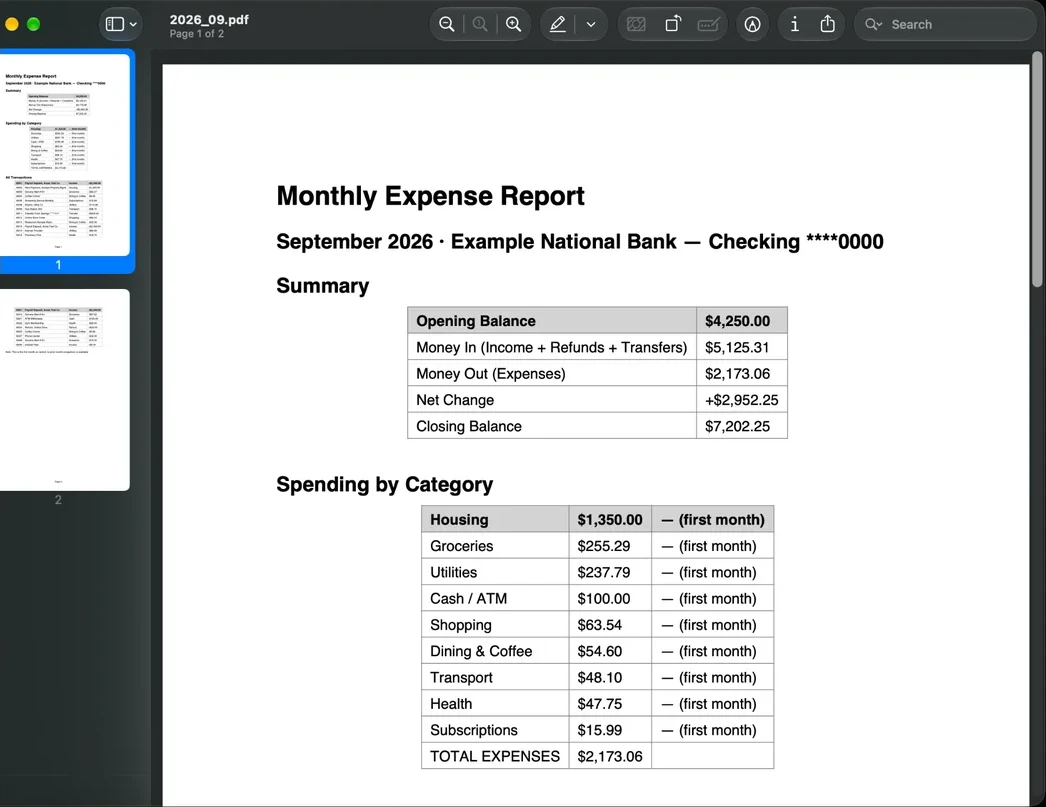
Month-end admin is easy to put off. On the last evening of each month, Hermes asks for your bank statements in Telegram, sorts each transaction into a category, and sends back a short summary and a PDF report. A merchant list on your server means it asks about each unknown merchant only once.
Your data
Statements and reports are stored as files on your VPS, but Hermes sends their contents to the model provider you configured so it can read them. Check that provider's data policy before you use real statements. The tips in the report are general, not financial advice.
Cron has no last-day-of-month option, so the job runs every evening and a small gate script decides whether to wake the agent. It returns true only when tomorrow is the 1st.
#!/usr/bin/env python3
import json
from datetime import date, timedelta

is_month_end = (date.today() + timedelta(days=1)).day == 1
print(json.dumps({"wakeAgent": is_month_end}))
Save it as ~/.hermes/scripts/month_end_gate.py the same way.
mkdir -p ~/.hermes/data/expenses/summaries ~/.hermes/data/expenses/reports
printf 'merchant,category\n' > ~/.hermes/data/expenses/merchants.csv
hermes config set cron.mirror_delivery true
sudo hermes gateway restart
cron.mirror_delivery lets you reply to a scheduled message, so when you send your statements, Hermes sees the reminder it sent.
Next, write the routine down once. Hermes reads this file every month instead of relying on memory. Paste this into a Hermes chat:
Save this as ~/.hermes/data/expenses/instructions.md:
1. Read every statement I send. Extract each transaction: date, description, amount.
2. Look up each merchant in merchants.csv in the same folder. If it is missing and you don't know it, search the web. If you are still unsure, ask me and wait.
3. Add every new merchant and its category to merchants.csv.
4. Do the math with code: money in, money out, what is left, and a sum per category.
5. Compare with last month's file in summaries/ and save this month as YYYY_MM.json there.
6. Use the pdf skill to build a report with a summary, a category table and the comparison with last month. Save it in reports/ as YYYY_MM.pdf. Check that page 1 looks right before you send it.
7. Reply with a short summary and three general tips, marked as not financial advice, and attach the PDF with MEDIA:/home/yourname/.hermes/data/expenses/reports/YYYY_MM.pdf
Replace yourname with your Linux user. The MEDIA tag needs the full path, and it's how Hermes sends a file as a Telegram attachment. Then create the job in the same chat:
Create a daily cron job named month_end_expenses that runs at 21:00 with the script month_end_gate.py. When it wakes, send me a short Telegram message asking for this month's bank and card statements as PDFs, and say you will follow ~/.hermes/data/expenses/instructions.md when they arrive.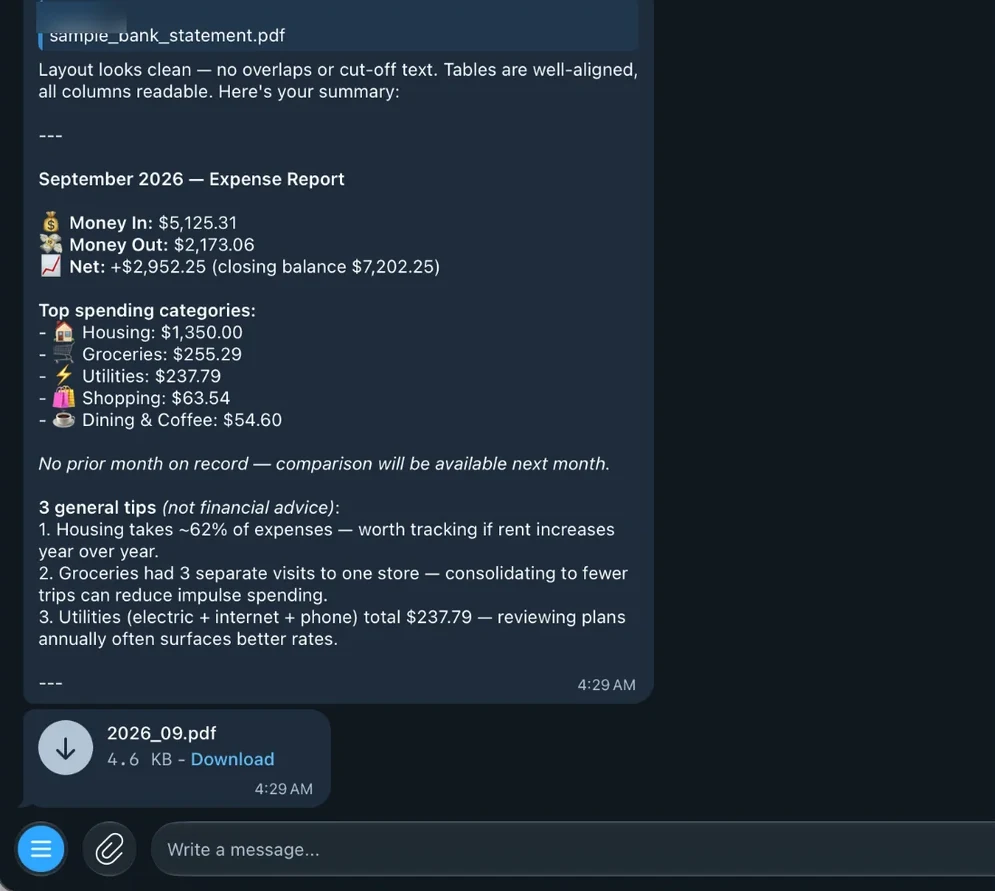
Telegram bots can receive files up to 20 MB, which covers most statements.
How Webdock fits
Files on Your Server
Dates, merchant lists and reports live in ~/.hermes on your VPS in Denmark, with snapshots included on every server.
Resize as Jobs Grow
Add RAM or CPU from the dashboard when you add more jobs. Your IP address and data stay on the same server.
Flat Monthly Price
The server costs the same with one job or twenty. Model API usage is billed by your provider.
Any chore that repeats, reads from a file and ends in a message fits this pattern. Start with the reminders file and add one job at a time. Back to Part 1 or Part 2, or read more about AI agents on Webdock.
Frequently asked questions
Not with --no-agent. The script runs and its output is sent as the message, with no model call. Jobs that wake the agent, like the expense report, only use tokens on the days the gate script lets them run.
Scripts must be inside ~/.hermes/scripts/, and the gateway must be running, since it runs the scheduler. Check with hermes cron status.
Yes, with the Google Workspace skill. It needs a Google Cloud project and an OAuth sign-in, so set it up separately. Keep the file as the source for yearly reminders.
The files stay on your server, but your model provider reads their contents. Use a provider whose data policy you accept, and take a snapshot of your server before you change the setup.
Only the server. Custom profiles start at EUR 4.30 a month, with SSL and snapshots included. Model and search API usage is billed by those providers.