

Part 1 installed Hermes Agent on a VPS. Now let's make it easy to reach from your browser, your desktop and your phone, and give it its first scheduled job.
What you'll set up
Dashboard
On your own subdomain, with HTTPS, a login and a service that survives reboots.
Telegram
Message the same agent from your phone. The Desktop app connects to the same backend.
Scheduled Jobs
A morning digest that runs at 8:00 and lands in Telegram without you asking.
Point a subdomain at your server
A subdomain gives the dashboard a fixed address and makes HTTPS possible. At your DNS provider, add an A record for a subdomain such as hermes.yourdomain.com that points to your server's IPv4 address (shown in the Webdock dashboard). Then add this Nginx server block, which forwards traffic to the dashboard on localhost.
server {
    listen 80;
    server_name hermes.yourdomain.com;

    location / {
        allow 203.0.113.10;   # replace with your own IP address
        deny all;
        proxy_pass http://127.0.0.1:9119;
        proxy_http_version 1.1;
        proxy_set_header Host $host;
        proxy_set_header X-Real-IP $remote_addr;
        proxy_set_header X-Forwarded-For $proxy_add_x_forwarded_for;
        proxy_set_header X-Forwarded-Proto $scheme;
        proxy_set_header Upgrade $http_upgrade;
        proxy_set_header Connection "upgrade";
    }
}
Two details matter:
- Upgrade and Connection headers: the dashboard chat runs over a WebSocket. Without them, the chat tab stops working behind the proxy.
- The allow and deny lines: only your own IP address can reach the dashboard. Replace 203.0.113.10 with yours, and add one allow line for each address you use.
sudo ln -s /etc/nginx/sites-available/hermes /etc/nginx/sites-enabled/
sudo nginx -t && sudo systemctl reload nginx
sudo certbot --nginx -d hermes.yourdomain.com
Certbot comes with Webdock's NGINX image. It adds the certificate, redirects HTTP to HTTPS and renews automatically. If UFW is active, check with sudo ufw status that web traffic is allowed, and run sudo ufw allow 'Nginx Full' if it isn't.
Add a login before you go public
This step keeps strangers away from your agent. The dashboard has no login while it only listens on localhost, so set one before you expose it. Hermes offers two options:
- Username and password: used in this guide. The Hermes docs recommend it only on a trusted network, which is why Step 1 limits the dashboard to your IP address.
- OAuth sign-in through Nous Portal: recommended for a team or for access from any network.
Store the credentials in ~/.hermes/.env, which the service in Step 3 reads.
PW=$(openssl rand -base64 18)
echo "HERMES_DASHBOARD_BASIC_AUTH_USERNAME=admin" >> ~/.hermes/.env
echo "HERMES_DASHBOARD_BASIC_AUTH_PASSWORD=$PW" >> ~/.hermes/.env
echo "HERMES_DASHBOARD_BASIC_AUTH_SECRET=$(openssl rand -base64 32)" >> ~/.hermes/.env
echo "HERMES_DASHBOARD_PUBLIC_URL=https://hermes.yourdomain.com" >> ~/.hermes/.env
chmod 600 ~/.hermes/.env
grep BASIC_AUTH_PASSWORD ~/.hermes/.env
Save the password in a password manager. The secret signs login sessions, so you stay signed in after a restart. Because this is one shared login, keep the IP limit from Step 1 in place.
Keep the dashboard running
Started by hand, the dashboard stops when you close SSH. A systemd service starts it at boot and restarts it if it stops. Check the path with which hermes first, and replace yourname with your sudo user.
[Unit]
Description=Hermes Agent Dashboard
After=network.target

[Service]
Type=simple
User=yourname
EnvironmentFile=/home/yourname/.hermes/.env
ExecStart=/home/yourname/.local/bin/hermes dashboard --host 127.0.0.1 --port 9119 --no-open
Restart=on-failure
RestartSec=5

[Install]
WantedBy=multi-user.targetsudo systemctl daemon-reload
sudo systemctl enable --now hermes-dashboard
sudo systemctl status hermes-dashboard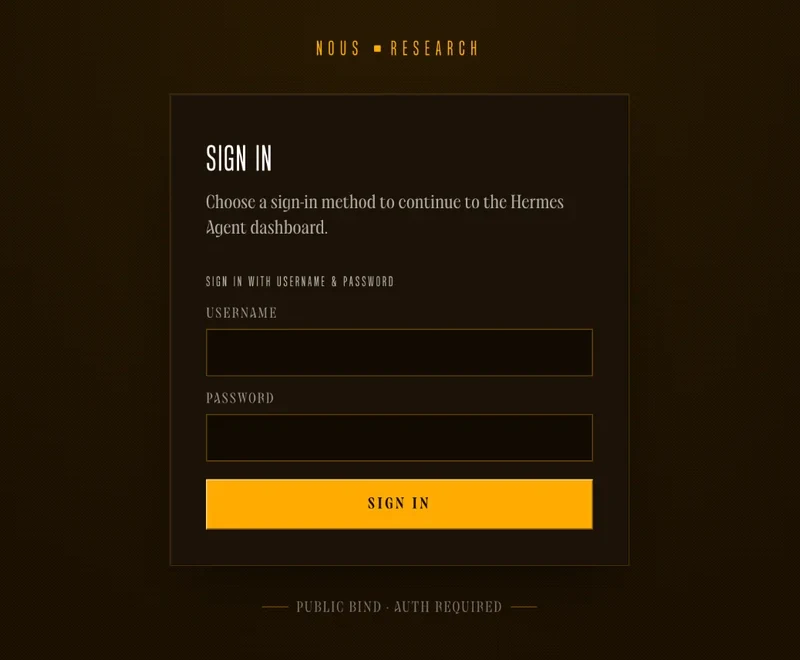
Connect the Hermes Desktop app
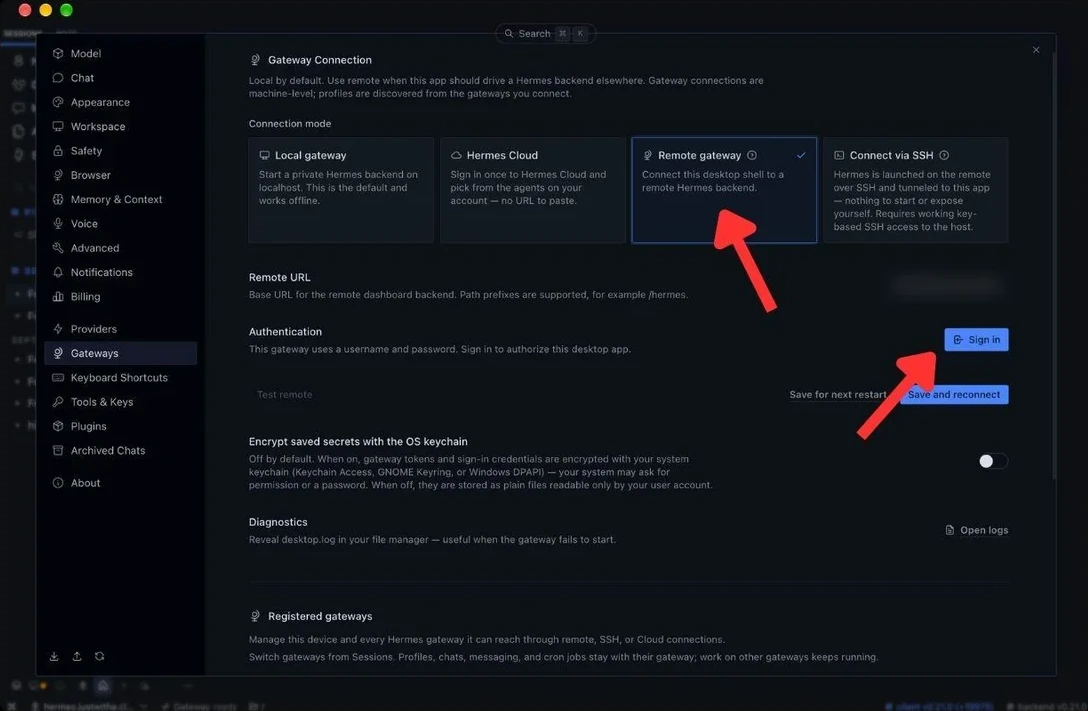
Prefer an app to a browser tab? Hermes Desktop (macOS on Apple Silicon, Windows and Linux) connects to the dashboard you just set up, so sessions and memory stay on your VPS.
- 1Open Settings, then Gateways.
- 2Choose Remote gateway and enter https://hermes.yourdomain.com.
- 3Sign in and click Save and reconnect.
Connect from an IP address you allowed in Step 1.
Chat from Telegram
Telegram puts your agent on your phone, wherever you are. Setup takes five short steps:
- 1In Telegram, message @BotFather, send /newbot and copy the bot token it gives you.
- 2Get your numeric Telegram user ID, for example from @userinfobot. Only allowed IDs can talk to your bot.
- 3Run hermes gateway setup, choose Telegram, and paste the token and your user ID.
- 4In the chat with your bot, send /sethome. Scheduled jobs deliver their results to this home channel.
- 5Install the gateway as a system service so it survives reboots: sudo hermes gateway install --system.
The gateway is a separate service from the dashboard. It handles messaging and runs your scheduled jobs, so it needs to stay up. Check it with hermes gateway status, then send your bot a message.
Schedule a morning digest
This is where the server pays off: a job that runs at 8:00 every morning, whether your laptop is open or not. A news digest needs a web search backend, and this example uses Firecrawl. Put the key in ~/.hermes/.env, not ~/.bashrc, so the gateway service can read it. Then restart the gateway.
echo 'FIRECRAWL_API_KEY=your_key_here' >> ~/.hermes/.env
sudo hermes gateway restart
hermes cron status
Test the prompt once in a normal chat, then schedule it. Every scheduled run starts a fresh session with no memory of earlier chats, so a prompt like "do my usual briefing" has nothing to go on. Spell out everything: topic, time window, number of stories and format.
/cron add "0 8 * * *" "Search the web for news about AI agents and open source LLMs from the past 24 hours. Find at least 5 articles and summarize the 3 most important. For each, give a headline, a 2-sentence summary and the source URL. Send the briefing to Telegram."Managing jobs
More jobs to hand off
Price Watch
Have Hermes check a product page on a schedule and message you only when the price drops below your limit.
Research Report
Send a research request from your phone at night and get one report back in the morning.
Inbox Triage
Connect Gmail and get a morning summary with proposed replies. Ask it to wait for your approval before anything is sent.
How Webdock fits
Snapshot Before Upgrades
Take a manual snapshot before you update Hermes. Automatic daily and weekly snapshots run as well.
Resize in Place
Add RAM when you enable browser tools or local models. Your IP address and data stay on the same server.
Engineers on Chat
Live chat with Webdock's engineering team is included on every plan, for questions about Nginx, firewalls or your server.
Next, Part 3 adds date reminders and a monthly expense report, built from small scripts and files, that run without a model call on quiet days. More on running agents on Webdock: AI agents on a VPS.
Frequently asked questions
No. An SSH tunnel works without one, as shown in Part 1. A domain with HTTPS is more convenient for daily use and makes the Desktop app easy to connect.
The gateway runs scheduled jobs, so nothing fires while it's stopped. Check with hermes cron status, and install the gateway as a service with sudo hermes gateway install --system.
It's one shared login, so the Hermes docs recommend it only on a trusted network. Keep the IP limit from Step 1 and use a long random password. For a team or access from any network, switch to OAuth sign-in.
Yes. hermes gateway setup lists them. Telegram is the quickest to set up because it only needs a bot token.
Only the server. Custom profiles start at EUR 4.30 a month, with SSL and snapshots included. Model and search API usage is billed by those providers.