Introduction
The Rescue Console is a feature that provides backup access to your server when standard access methods fail. It is primarily used to recover access after SSH misconfiguration or to diagnose boot-related issues that prevent normal login.
Using Rescue Console
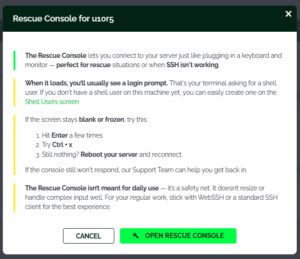
To access the Rescue Console, click the wrench icon in the server dashboard. This opens an information dialog from which the console session interface can be started. Once the terminal prompt appears, you can interact with the system.

When opening the Rescue Console, a dialog appears. Review the information before proceeding.
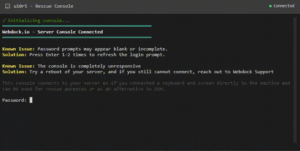
After starting the console session, a terminal interface is displayed. Log in using an existing shell user account to begin troubleshooting or recovery tasks.
If the server fails to boot entirely, you can use the Rescue System OS. This environment allows you to mount disk partitions, modify system files, and recover data from the existing installation.
Using Rescue System
Note: This operation involves direct disk and system modifications. Create a snapshot of your server before proceeding to ensure you can restore its previous state if needed.
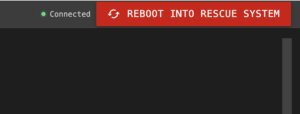
To activate the Rescue System, open the Rescue Console interface and click the ‘Reboot into Rescue System’ button. A confirmation dialog is displayed with important details about the process.
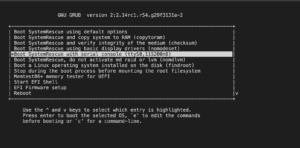
During boot, a menu is displayed with ‘Serial Console’ selected by default. You have 3 seconds to choose an alternative boot option before the default selection is applied automatically.
Wait a few seconds while the Rescue System completes the boot process. A terminal interface will be displayed once the system is ready.
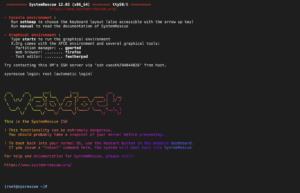
The Rescue System includes network access and preinstalled tools such as scp and rsync. You can mount disk partitions, diagnose boot issues, and transfer data to another server if necessary. This is particularly useful when the primary operating system is inaccessible.
Running the reboot command inside the Rescue System restarts the Rescue OS only. To return to the normal operating system, use the ‘Restart’ button in the Webdock dashboard. This action detaches the rescue ISO and allows the server to boot into its primary OS.
If network connectivity is unavailable in the Rescue System, contact Webdock Support for assistance with troubleshooting and recovery.”
The Rescue Console Is Secure
The Rescue Console is designed to be secure. Access to the Rescue Console requires a valid authenticated Webdock session. Session validity is rechecked every 10 seconds and terminated if expired. Enable two-factor authentication (2FA) on your Webdock account to enhance account security.
After authentication, the Rescue Console proxies a connection to the host machine over a secure internal VLAN with encrypted communication. It then uses the hypervisor’s serial console functionality (Incus/KVM) to establish a direct connection to the server. Once connected, you must authenticate using an existing shell user account.
Conclusion
The Rescue Console provides reliable access for recovering servers that are inaccessible due to SSH misconfiguration, boot failures, or other system-level issues.


